SSL Certificate Renew
SSL certificate Update (Renew)
Overview
SSL certificates have a validity period and must be renewed periodically (typically yearly) to ensure uninterrupted secure access to applications. The following describes the recommended process for renewing SSL certificates in ADC and applying them to frontend servers without service disruption.
Certificate Renewal Lifecycle
The SSL certificate renewal process in nBalance consists of the following stages:
- Renew the SSL certificate with the Certificate Authority (CA)
- Upload the renewed certificate to nBalance
- Apply the renewed certificate to HTTPS frontend servers
- Verify successful deployment
Prerequisites
- A renewed SSL certificate obtained from a trusted Certificate Authority
- The frontend server must already be configured for HTTPS
Step 1: Upload Renewed SSL Certificate Upload the renewed SSL certificate (if not already uploaded) using the following link: Certificates
Step 2: Apply Renewed SSL Certificate to Frontend Server After uploading the renewed certificate, it must be applied explicitly to HTTPS frontend server. Procedure
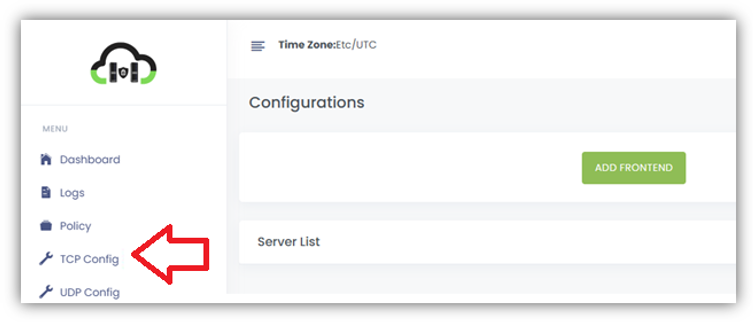
- From the left navigation menu, click TCP Config.
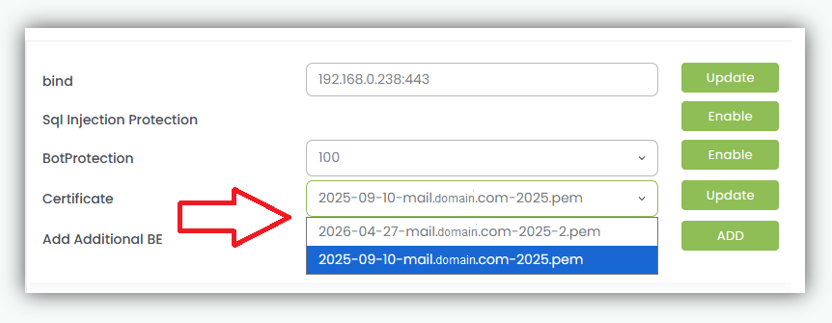
- Locate the required HTTPS Frontend Server to which the new certificate will be applied.
- In the Certificate drop down list, select the renewed SSL certificate
- Click Update to apply the new certificate.
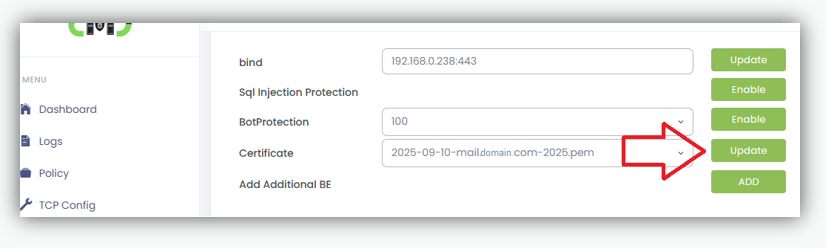
Result
- The frontend server is updated to use the renewed SSL certificate.
- All new HTTPS connections immediately use the updated certificate.
- A confirmation message is displayed after the update.
Step 3: Verify Certificate Update Administrators should confirm that the renewed certificate is active.
Verification Steps
- Access the application URL using HTTPS
- Verify the certificate expiry date in the browser
- Ensure no SSL warnings or errors are displayed
Notes and Best Practices
- Uploading a renewed certificate does not automatically replace certificates on frontend servers.
- Each HTTPS frontend server must be updated individually.
- A single SSL certificate may be reused across multiple frontend servers.
- Certificates cannot be deleted while actively assigned to a frontend server.
- It is recommended to renew and apply certificates before expiry to avoid service interruption.